
WritingHabit logo
WritingHabit
PricingFeaturesBlogMission
Sign inCreate account
Topics
    Project and daily goal tracking
    Manual project tracking
    Chapter stats summary
    Writing streaks
    Words per hour (chart)
    Words added/cut/inserted (chart)
    Stretch goals (automatic)
    Cross-project words/min (chart)
    Most productive day/time
    Closest competitor
    Forecasted target completion
    Words needed to finish
    Current vs. previous week
    Year in Review
    Leaderboards (Day/Month/Year)
    Sprints: Solo or multi-player
    Sprints: Solo
    Sprints: Multi-player
    Long Sprints: 30 minutes +
    Closest competitor
    Writing Prompts
    Outliner
    Chapter author notes
    Story structure templates
    Folders and reference documents
    Drag-and-drop re-ordering
    Character profiles
    Plot points
    Tags (supercharged)
    Visual timeline
    Chapter summaries
    Visual references
    Focus mode
    Dark/Light mode
    Typewriter mode
    Editor configuration (widgets)
    Import/Export (.docx, .html)
    Version history
    Deleted document history
    1-Click E-pub format/export
    Version comparison
    Backup to Google Drive
    Writing groups
    Comments
    Quick action bar (editing marks)
    Reviews
    Suggest edits/track changes
    Beta reader questionnaire
    Word usage
    Repetitive words
    Custom autocorrections
    Review relevance
    1-click indent all paragraphs
    Styled section breaks
    1-click split chapter
    Drop caps
    Public or private projects
    Shareable links
    Collaborative writing
    Emotion thesaurus
    Read public projects
    Follow projects and authors
    Contribution points
    Profile and activity feed
    Notifications for followers and subscribers
    Direct messages
    Automatic chapter publication activity
    In app notifications
    Mobile friendly website
    Very involved dev team
    Prioritized support
    Prioritized feature requests
    Affiliate Program
    Mobile app
    Contributor leaderboards
    Public project promotion
    KPD ready export templates

Feature glossary
Familiarize yourself with
all the goodies

Analytics

Project and daily goal tracking

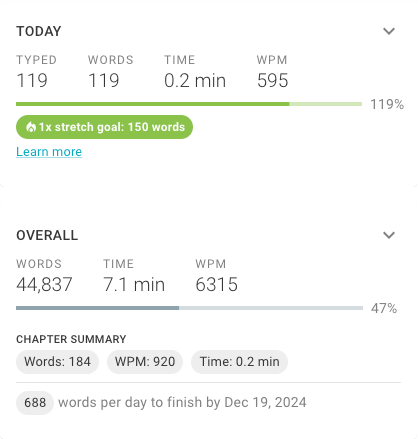
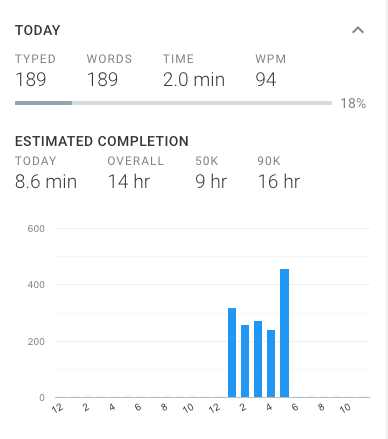
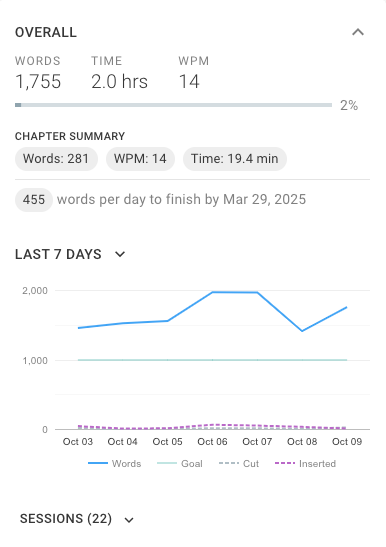
Track your performance against your goals. Within a project, you have stat cards that show either your work count for today, or overall. The overall widget also shows you how many words you need to write today to reach you total word count goal by the deadline you set for yourself. You can also turn these on and off whenever you want.

Stretch goals

When you reach your goal, automatic stretch goals kick in, encouraging you to reach ever higher. This leverages our brains desire to complete things and subconsciously pushes you forward.

Expandable content

You can also expand either card to get additional insights like charts, projected time to reach different word counts, detailed writing session information, and more.

Free
Project and daily goal tracking

Manual project tracking

To help more author’s gain the motivational benefit of stat tracking and leaderboards, manually tracked projects let you record your writing sessions. You can be as precise as you want to get the same data that other users can see from their automatically tracked projects. One drawback is that other users can hide manually tracked projects from the leaderboard if they desire to. To get started, visit your dashboard, choose “Create project” and click “Manually tracked.”

Free

Chapter stats summary

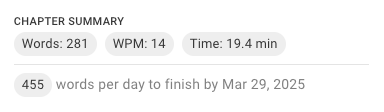
The chapter stats summary lets you review your output and focus for each writing session, highlighting your words written, time spent, and average words per minute. This helps you understand your baseline and recognize opportunities to increase your efficiency.

Free
Chapter stats summary

Writing streaks

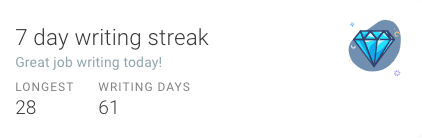
Writing streaks help you build lasting habits. Seeing your consecutive days of writing grow creates momentum and a sense of accomplishment, motivating you to stick to your writing goals and keep your story moving forward. Research shows that maintaining streaks activates your brain’s reward centers, encouraging you to keep writing consistently. Free user have access to a 30 day streak.

Hobbyist subscription required
Writing streaks

Words per hour (chart)

The words per hour chart provides valuable insights into your peak productivity windows. By visualizing when you write the most, you can intentionally block off those optimal times to maximize your output. Similarly, the most productive day/time data point enables you to protect your highest-yielding writing sessions.

Hobbyist subscription required
Words per hour (chart)

Words added/cut/inserted (chart)

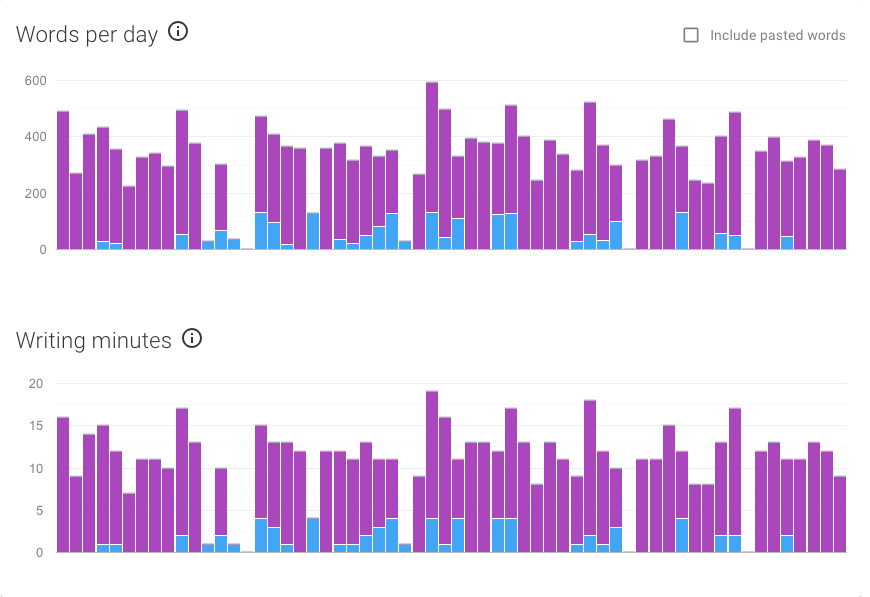
This chart shows how your project evolves over time by tracking words you’ve typed, deleted, and inserted (copy/paste). Pasted words don't count toward your leaderboard rank or challenges to avoid unfair advantages or fake word counts. This chart offers a clear picture of your writing process, giving you insight into your writing habits and the growth of your story.

Hobbyist subscription required
Words added/cut/inserted (chart)

Stretch goals (automatic)

Stretch goals help you maintain momentum by increasing your target automatically once you’ve met your daily writing goal. These additional goals encourage you to write more and reach new milestones without needing to set them yourself.

Hobbyist subscription required

Cross-project words/min (chart)

This chart shows how many words you’ve written and how much time you’ve spent writing across all your projects during a selected time period. It provides a clear overview of your productivity, helping you track your overall progress on your writing dashboard.

Hobbyist subscription required
Cross-project words/min (chart)

Most productive day/time

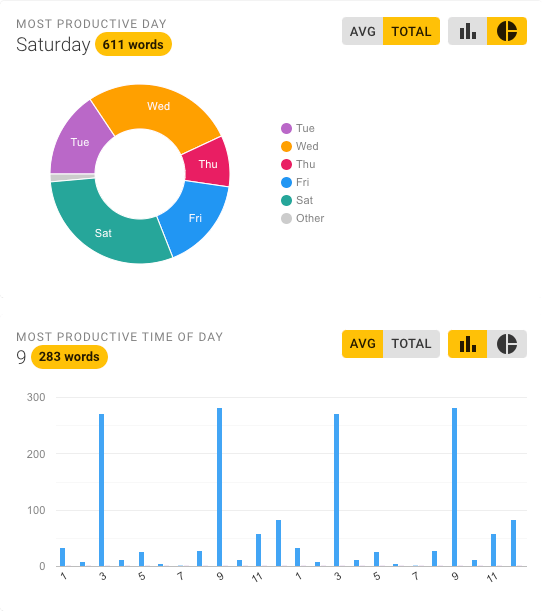
Identify the days and hours when you write the most to maximize your productivity. By knowing your peak writing times, you can protect those periods and focus on increasing your word count efficiently.

Pro subscription required
Most productive day/time

Closest competitor

When you need a small nudge to go just a little farther, the closest competitor widget in the editor shows you who is ahead of you on the leaderboard so you know how many words you need to beat them.

Hobbyist subscription required

Forecasted target completion

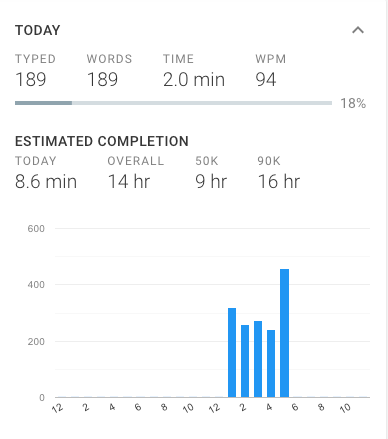
Forecasted target completion provides an estimate of how long it will take to finish your daily goal and larger project targets based on your current words-per-minute pace. This feature helps you plan your writing sessions more effectively and stay on track to meet your deadlines.

Pro subscription required

Words needed to finish

Words needed to finish calculates the daily word count required to meet your chosen deadline. This feature helps you stay on track by breaking your goal into manageable targets, giving you a clear plan to finish your book or project on time.

Pro subscription required
Words needed to finish

Current vs. previous week

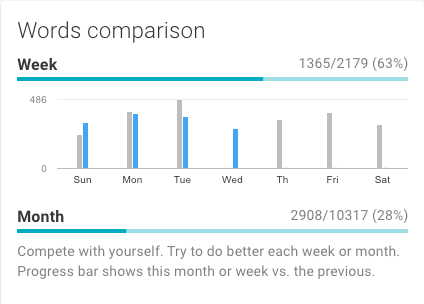
Track your writing progress by comparing how many words you’ve written this week to the same period last week. You can also view your monthly totals side-by-side to see your growth over time. Use this data to challenge yourself, set new benchmarks, and stay motivated to write more.

Pro subscription required
Current vs. previous week

Year in Review

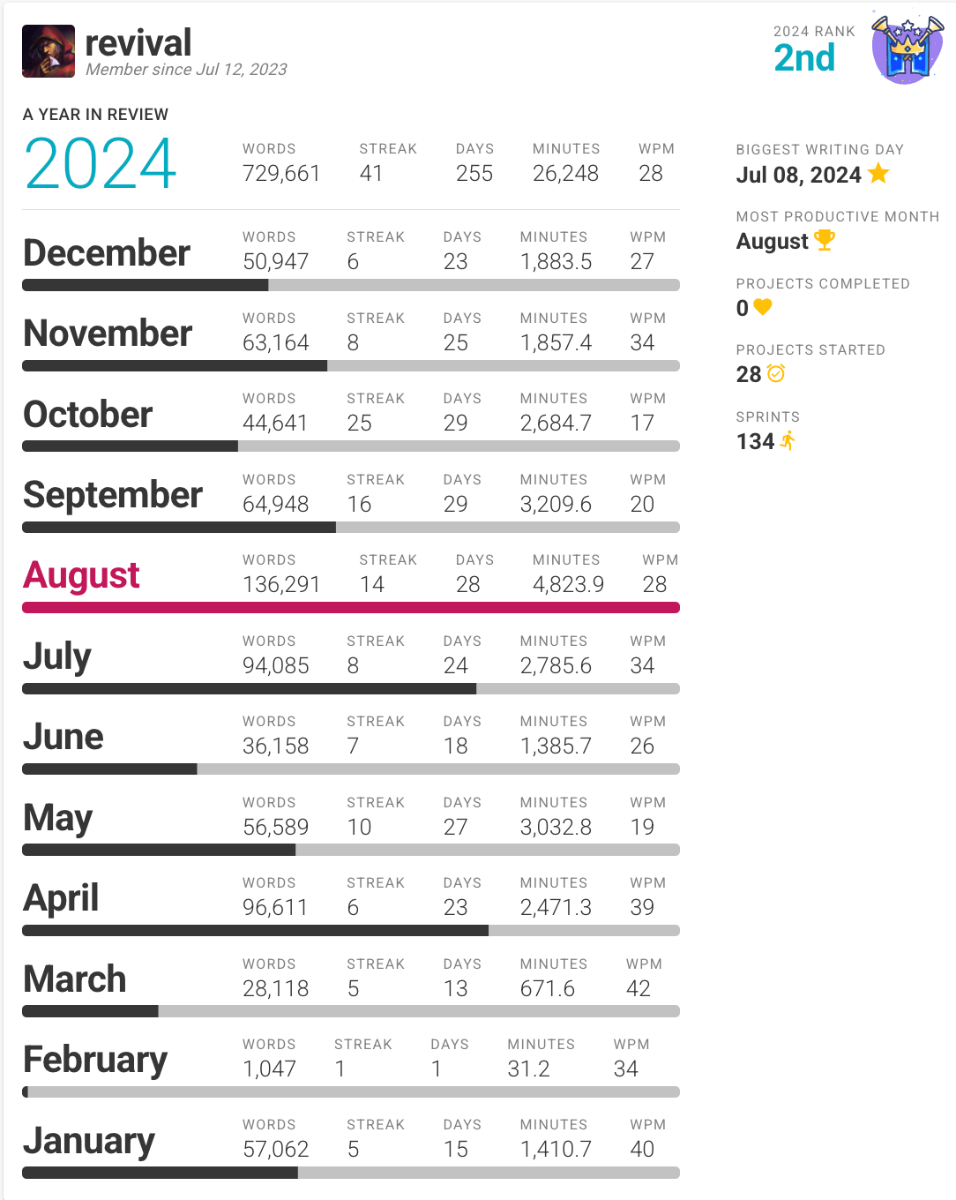
Your Year in Review is a summary of all the writing stats we’ve tracked this year. With these insights, you can celebrate your progress, recognize patterns in your writing habits, and set actionable goals for the new year. Your Year in Review includes:

  • Total Words Written

  • Longest Writing Streak

  • Days Spent Writing

  • Minutes Dedicated

  • Most Words in a Day

  • Most Productive Month

  • Projects Started & Completed

  • Writing Sprints Completed

Pro subscription required
Year in Review

Motivation

Leaderboards (Day/Month/Year)

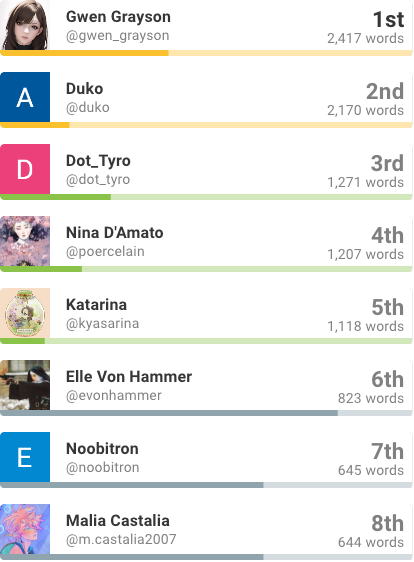
Leaderboards help you stay inspired by showing how your writing progress compares to others. Track your performance daily, monthly, or yearly, and use the friendly competition to push yourself to write more and achieve your goals. It’s a fun way to celebrate your progress and stay consistent.

Hobbyist subscription required
Leaderboards (Day/Month/Year)

Sprints: Solo or multi-player

Compete against yourself or others in timed or word goal writing sprints.

Free: 2 per week
Hobbyist: Unlimited
Pro: Unlimited

Sprints: Solo

Solo sprints are your personal challenge to write as much as you can within a set time or word goal. They help you stay focused, beat distractions, and build momentum, making every session more productive. Race the clock or fight a monster.

Free: 2 per week
Hobbyist: Unlimited
Pro: Unlimited

Sprints: Multi-player

Multi-player sprints connect you with other writers in timed or word goal challenges. Compete in real-time to push your limits, stay accountable, and share the energy of a writing community.

Free: 2 per week
Hobbyist: Unlimited
Pro: Unlimited

Long Sprints: 30 minutes +

A long sprint is a timed session of 30 minutes or more, designed for deep focus. Whether competing solo or with others, these extended sessions are ideal for tackling complex scenes, brainstorming big ideas, or achieving ambitious goals while building endurance and making real progress.

Pro subscription required

Closest competitor

The closest competitor widget appears in your writing editor, keeping you motivated by showing how close you are to the next writer on the daily leaderboard. As you write, it updates in real time, letting you see who is ahead of you and by how many words. If you’re tied, it notifies you, and if you reach first place, it shifts to show how far behind second place is. You can customize how and where this widget appears in your editor, ensuring it fits seamlessly into your workflow while pushing you to keep writing.

Hobbyist subscription required
Closest competitor

Writing Prompts

Explore five new writing prompts each week to spark ideas and overcome writer’s block. When you choose a prompt, it creates a writing prompt project, where your writing stats are tracked to help you meet your writing goals. You can access all your started prompts anytime from the Prompts tab in your dashboard.

Want feedback? Make your prompt public so others can read and share their thoughts.

Free

Planning

Outliner

The outliner helps you organize every aspect of your story. Rearrange chapters with drag-and-drop functionality, use folders to store reference documents, and add tags to keep everything categorized. Write chapter author notes, map out plot points, create character profiles, and use novel structure templates to guide your process. Everything you need to plan and structure your story is seamlessly integrated in one place.

Free

Chapter author notes

Add notes for your readers, offering additional context or making specific requests. Choose whether to display these notes at the beginning or end of a chapter, making it easy to guide your audience through your story or provide important insights.

Free

Story structure templates

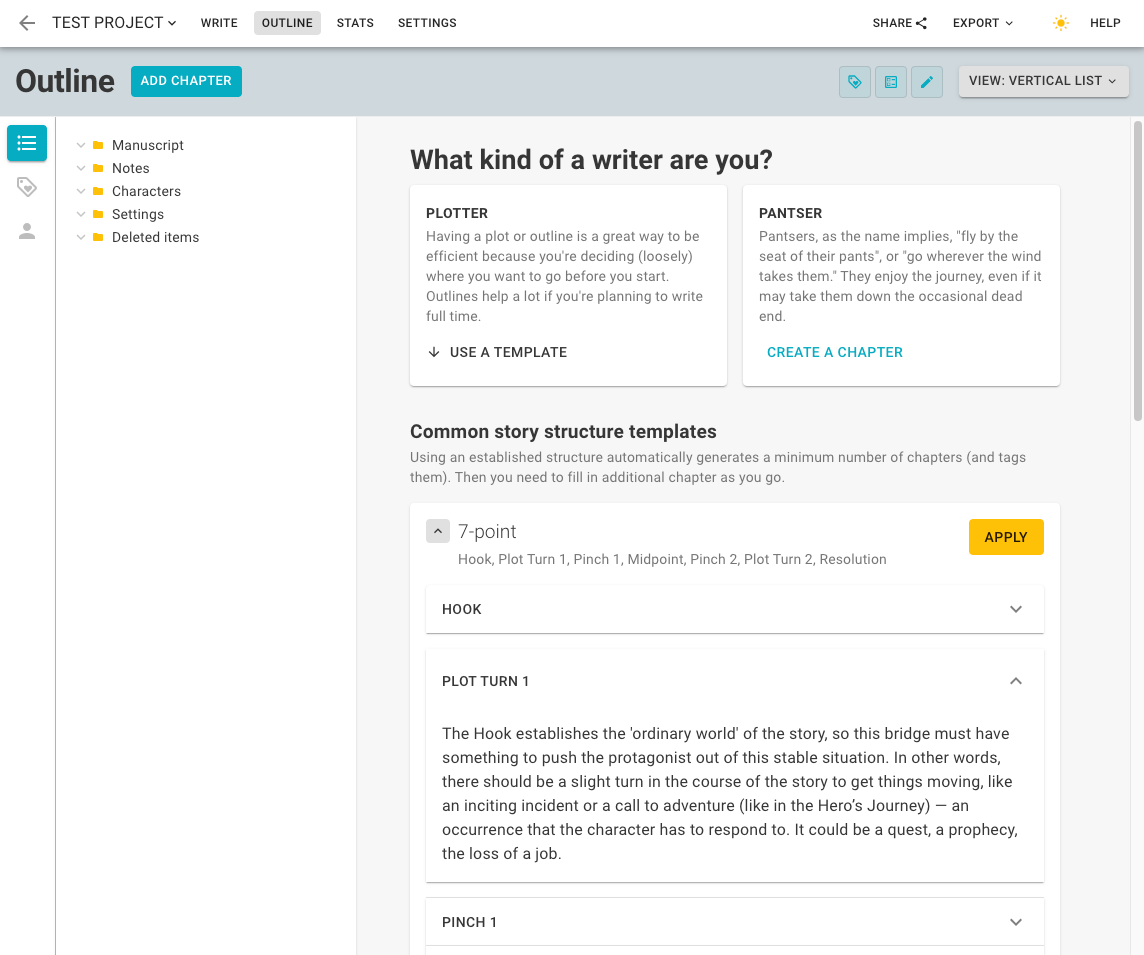
Story structure templates provide a customizable framework to help you quickly organize and shape your novel. Choose from:

  • 7-Point Story Structure: Focus on seven critical turning points—hook, first plot point, midpoint, second plot point, climax, and resolution—to craft a well-paced, engaging narrative.

  • 3-Act Structure: Divide your story into three key parts: setup, confrontation, and resolution.

  • Freytag’s Pyramid: Use this classic five-part framework to guide your story through exposition, rising action, climax, falling action, and resolution.

  • Fichtean Curve: Build tension by starting in the middle of the action. Layer escalating conflicts and climactic peaks to create intensity, then bring the story to a resolution.

These templates give you a strong starting point and the flexibility to adjust your outline as your story develops.

Free
Story structure templates

Folders and reference documents

Keep your story details organized with folders for notes, character profiles, world-building, and other essential reference materials.

Free

Drag-and-drop re-ordering

Drag-and-drop reordering lets you quickly organize your story elements. Rearrange chapters, reference documents, and plot points to keep your outline and ideas structured exactly how you need them.

Free

Character profiles

Character profiles help you organize and develop your story’s cast. Use customizable templates to outline traits, backstories, goals, motivations, and more. Whether for protagonists or side characters, these profiles ensure your characters are well-defined and consistent throughout your story.

Free

Plot points

Plot points are key events in your story that define its structure. Add them to chapters and rearrange with drag-and-drop to refine your outline as your story develops.

Free

Tags (supercharged)

Tags are a powerful way to organize and track elements of your story. Color-coded by character, emotion, setting, structure, POV, or custom categories, they update your visual timeline and influence reader reviews, giving you a clear overview of your story’s key details.

Free

Visual timeline

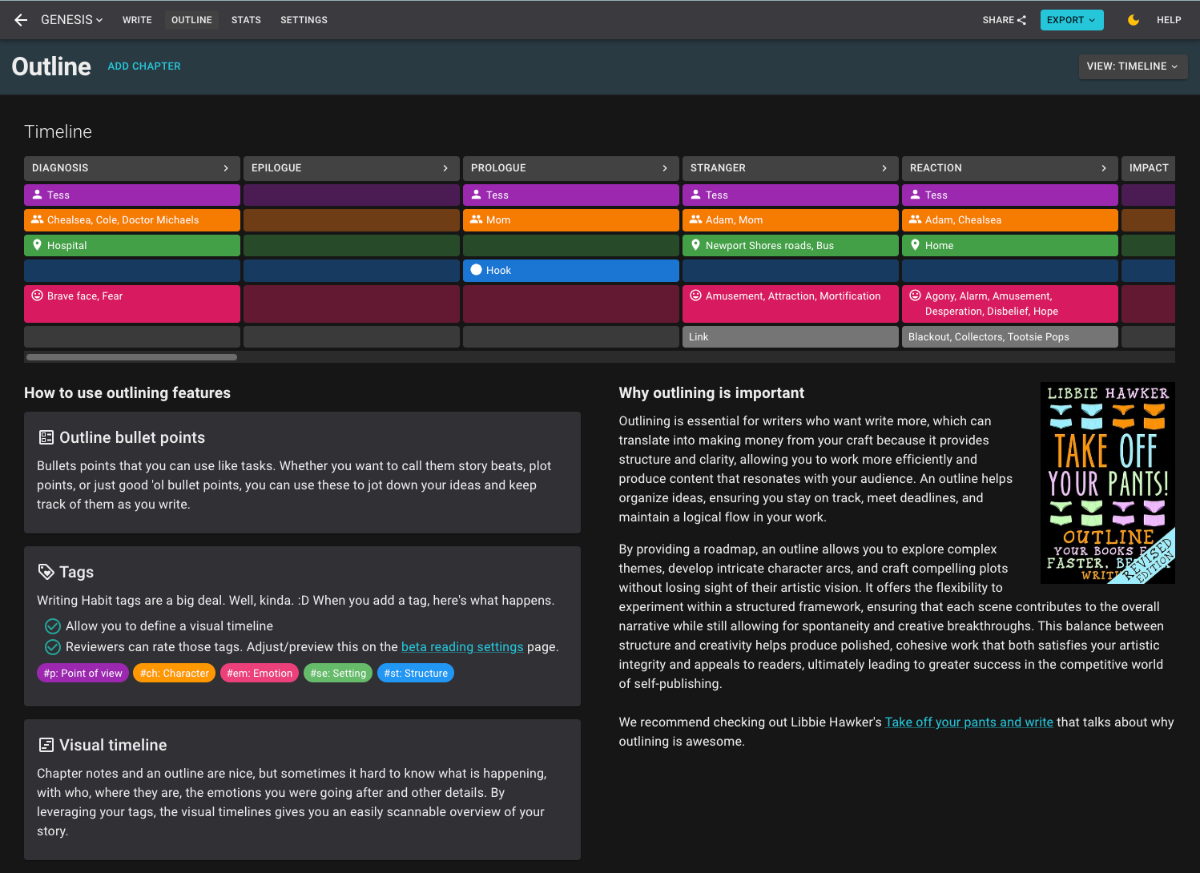
The visual timeline gives you a clear, at-a-glance view of your story’s timeline. Using tags, you can easily track characters, emotions, settings, POV, and more to see how your story unfolds over time.

Hobbyist subscription required
Visual timeline

Chapter summaries

Pro subscribers can generate quick summaries of chapters to track plot points, character details, and key events. The AI-generated summary is added to the outliner in your chapter summary and plot points for easy reference. Each request requires 500–7,000 words and is currently limited to one use per document (chapter) as we refine the feature.

Note: This feature does not retain any data. When you request a summary, your current chapter content is sent to Google’s Gemini model, and the generated summary is added to your outliner chapter summary and plot points. The AI does not remember past chapters or previous content, so it lacks context and may produce inaccuracies.

Pro subscription required

Visual references

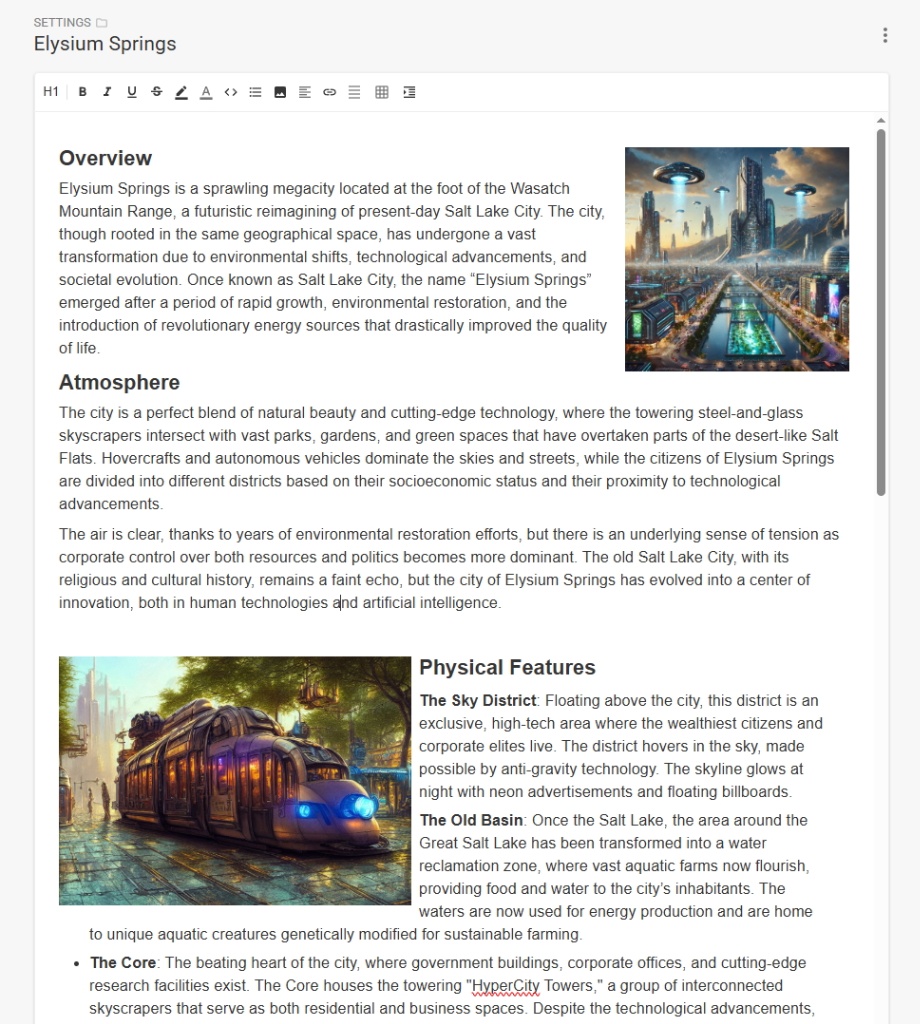
Visual references let you enhance your notes, characters, and settings with visuals to spark creativity and keep your ideas organized. Whether you're adding a character or setting reference, a map of your world, or an inspiring mood board, this feature helps you capture your vision in one place.

Free: 1 image
Hobbyist: 5 images
Pro: 15 images
Visual references

UI Customization

Focus mode

Remove unnecessary interface elements so you can focus on your writing without distraction.

Free
Focus mode

Dark/Light mode

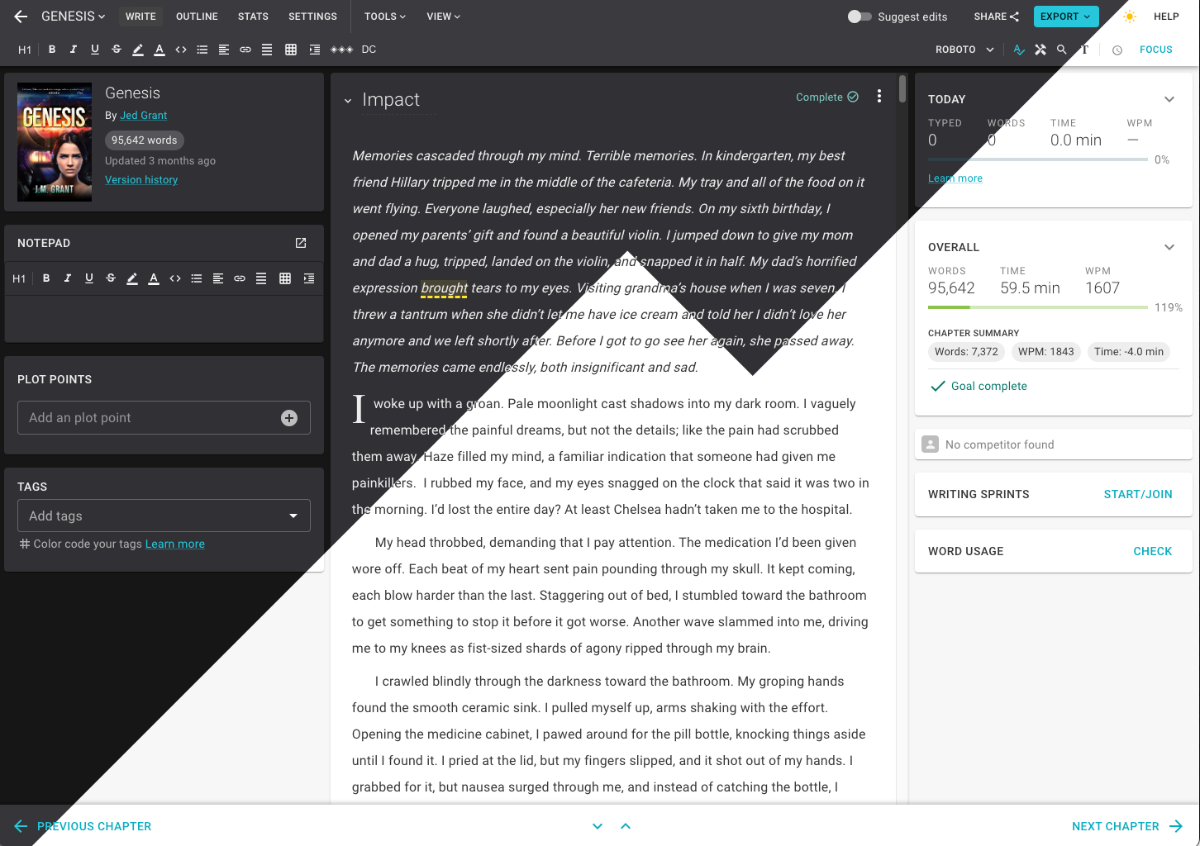
Dark/light mode lets you customize your writing environment. Choose a darker theme to reduce eye strain or a brighter theme for a more vibrant look. Swap anytime for a more comfortable writing experience.

Free
Dark/Light mode

Typewriter mode

Typewriter mode keeps your cursor fixed in the center of the screen as you type, mimicking the feel of a traditional typewriter. This layout helps reduce distractions, eliminates the need to scroll, and keeps you focused on your current sentence or paragraph.

Free

Editor configuration (widgets)

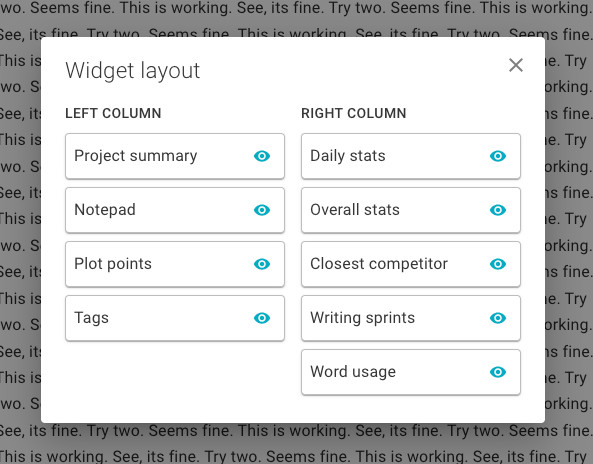
Editor configuration allows you to hide, show, and rearrange widgets to suit your writing needs. Customize your workspace to focus on what matters most and create an environment that enhances your productivity.

Hobbyist subscription required
Editor configuration (widgets)

Content management

Import/Export (.docx, .html)

Import/Export allows you to transfer your work effortlessly in .docx or .html formats. Quickly bring in existing files to get started or export your work for easy sharing or publishing. It’s a fast and flexible way to manage your writing projects.

Free

Version history

Version history lets you see how your chapter evolves over time. Access previous versions to review changes, restore content, or keep a backup of earlier drafts.

Free: Last 1
Hobbyist: Last 5
Pro: All versions

Deleted document history

Deleted document history lets you easily recover previously deleted documents and keep your projects on track. Access to deleted document history varies by subscription level.

Free: 1 day
Hobbyist: 30 days
Pro: Unlimited

1-Click E-pub format/export

Format and export your project as a KDP-ready e-book. Choose your styles, customize your layout, and create a professional ePub file in seconds. This feature is available with select subscription levels.

Hobbyist subscription required

Version comparison

Version comparison allows you to review how your work has changed by comparing any available versions. Easily spot edits and refinements to track your progress or restore content.

Pro subscription required

Backup to Google Drive

Easily back up your story to Google Drive to ensure you always have a copy in more than one place.
Pro subscription required

Editing and Feedback

Writing groups

Writing groups give you a way to work more closely with others. It also gives you a discussion forum and leaderboard just for your group. You can make it public, private, or require approval to join. Additionally, you can provide details about when your group meets and the genres you write in to make sure you find the right people.

Free

Comments

Insert comments directly in your text, just like in Google Docs or Word. Use them to give feedback, ask questions, or set reminders for revisions. Whether collaborating with others or refining your own work, comments help keep your writing process organized.

Free

Quick action bar (editing marks)

The quick action bar provides professional editing marks that give contributors a clear and structured way to give feedback. Each mark comes with examples, ensuring authors understand the suggestions and can take action. These tools make feedback easy to understand while helping readers learn to give high-quality, actionable reviews.

Free

Reviews

Reviews allow readers to provide feedback on your chapters, tied to the specific version they reviewed. Customize the feedback process using tools like the beta reader questionnaire to ask targeted questions and tag specific elements, such as characters, plot, or tone. This helps you gather precise insights.

Free

Suggest edits/track changes

The suggest edits/track changes feature lets you review and revise your work seamlessly. Suggestions appear inline within the text, making feedback clear and easy to apply. Collaboration and editing are as intuitive as in Word or Google Docs.

Free

Beta reader questionnaire

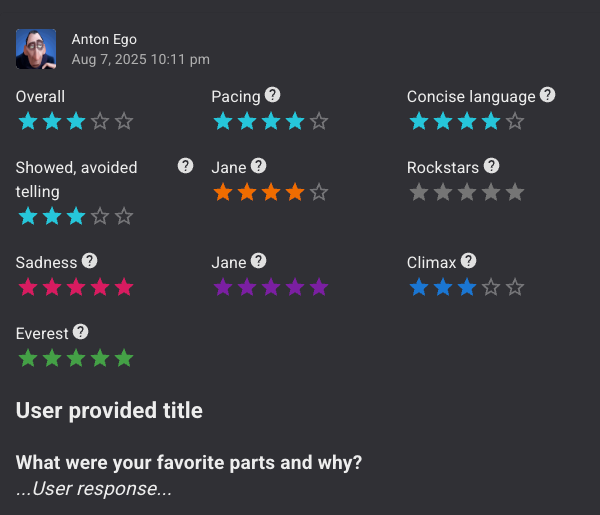
The beta reader questionnaire allows you to tailor the feedback process by selecting specific questions and rating elements. This ensures you receive targeted, actionable insights to refine your story and meet your goals.

Hobbyist subscription required
Beta reader questionnaire

Word usage

Track the frequency of words in your manuscript to spot overused words. Use auto-detection or add custom words to monitor during editing, ensuring your writing stays varied and engaging.

Hobbyist subscription required

Repetitive words

Detect when a word is repeated in close proximity, which can distract readers. Highlight repeated words with one click to quickly refine your manuscript.

Hobbyist subscription required

Custom autocorrections

Custom autocorrections let you define character replacements to streamline your writing. Automatically correct misspellings or create shortcuts for longer words—for example, type “bc” for “because.” Customize it to fit your writing style and save time.

Pro subscription required

Review relevance

Review relevance helps you understand feedback by linking it to the chapter version it’s based on. If a chapter has been updated, this feature makes it easy to determine whether older feedback is still applicable. Use chapter version comparison to see what has changed and decide how feedback aligns with your latest draft. This ensures your reviews remain useful as your work evolves and let's readers know which reviews are no longer relevant.

Pro subscription required

Formatting

1-click indent all paragraphs

Save time and get all your paragraphs indented with a single click. All indenting in WritingHabit is eBook safe and will not lead to formatting errors.

Free

Styled section breaks

Don’t settle for the basic triple asterisk. With one click, you can enhance your manuscript by adding elegant, pre-designed section breaks that bring flair and professionalism to your story.

Hobbyist subscription required

1-click split chapter

Break your chapter into multiple pieces with one click. Whether you’re restructuring or editing your story, this feature helps you reorganize quickly and efficiently.

Hobbyist subscription required

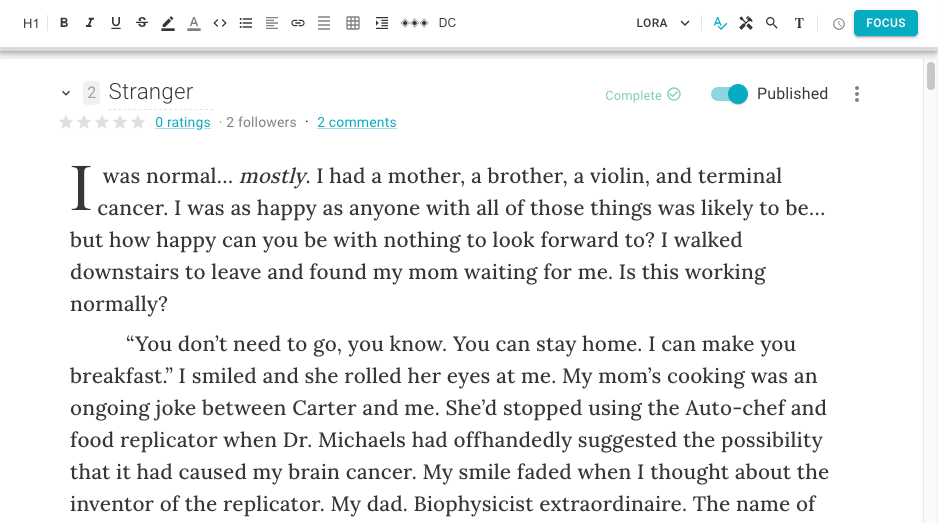
Drop caps

Drop caps let you enhance the first letter of your chapter with a stylish, enlarged design. This classic formatting option gives your story a polished, professional look right from the first word.

Hobbyist subscription required

Access control

Public or private projects

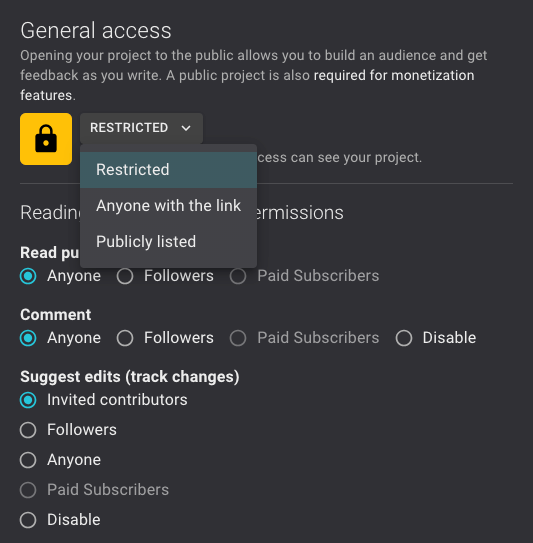
Control who can see your work. Write privately for yourself, or share your project with the community to gather feedback and connect with others. The choice is yours.

Free
Public or private projects

Collaborative writing

Write with a partner in real time, seamlessly sharing ideas and edits. Individual stats are tracked for each writer. This feature is available with a Pro subscription.

Free

Assistive (non-AI)

Emotion thesaurus

The emotion thesaurus helps you show, not tell, your characters’ feelings, making them more vivid and engaging for readers. Open the emotion thesaurus or type a hashtag (e.g., #anger) to access a list of emotions with examples for physical actions or internal expressions.

Hobbyist subscription required

Reading

Read public projects

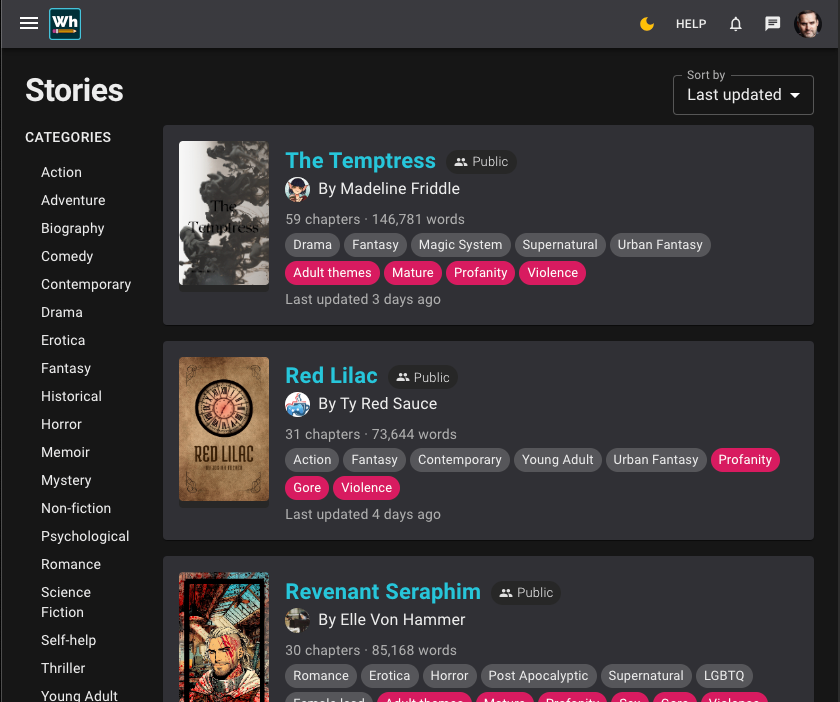
Explore public projects to read other writers’ work, or share your own to gather feedback and build your audience. Similar to platforms like Wattpad and Royal Road, this feature lets you connect with readers and writers alike. In the future, you’ll also have the option to let readers subscribe to your work.

Free
Read public projects

Follow projects and authors

Stay connected with your favorite authors and projects by following them. Receive notifications about updates, new chapters, and more to keep up with the stories and creators you love.

Free

Contribution points

When you leave a comment on someone’s project, anyone can vote on that comment to indicate that they think it added value. This increases your contributor reputation. We plan to leverage this to display a contributor leaderboard, but also for beta readers and editors to gain reputation and social credibility that can be leveraged by writers to know which editors and beta readers are exceptional.

Free

Author platform

Profile and activity feed

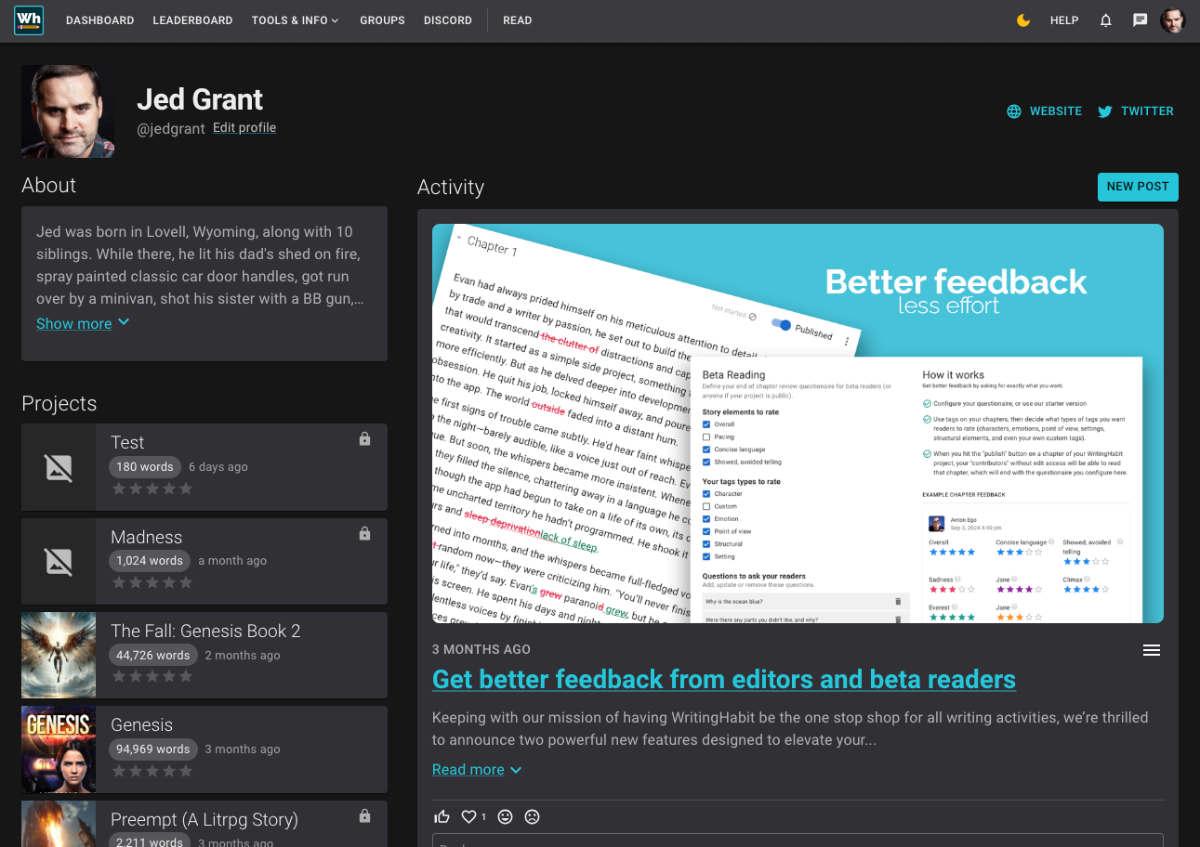
Your profile allows you to showcase your work. Whether it’s you bio, blog posts, links to your own websites, leaderboard rank or anything else—your profile is where people can learn about you and you can share your thoughts with others.

Free
Profile and activity feed

Notifications for followers and subscribers

Notifications keep your followers and subscribers (future feature) informed when you release new content. By alerting your audience to updates, you keep them engaged, encourage timely feedback, and build a stronger connection with your readers.

Free

Direct messages

While writing doesn’t require direct messages, connecting with friends and fans does. Use direct messages to communicate with friends, fans, and collaborators. While the primary focus on WritingHabit isn’t on social connection, we believe connecting with others can help you maintain your momentum and keep writing. In the future, as reader subscriptions become available, this feature will help you manage your community and maintain connections.

Free

Automatic chapter publication activity

Automatically inform your readers and followers when you publish a new chapter in a public project. For example, if you release three new chapters, we’ll generate three posts on your profile, each with an excerpt. This means you don’t have to expend any effort to create individual posts to announce your updates, it just takes a few clicks.

Hobbyist subscription required

General

In app notifications

Get notified of critical events you subscribe to in the app.

Free

Mobile friendly website

WritingHabit’s mobile-friendly website lets you write, edit, and organize your projects on your phone or tablet. Whether you’re at home or on the go, you’ll have full access to your work anytime, anywhere.

Free

Very involved dev team

If you need a new feature, let us know! Many improvements can be made quickly to ensure your writing experience feels effortless. Even small inconveniences matter to us—reach out, and we’ll work to address them. Connect with us on Discord to share your ideas and feedback: https://discord.gg/G7ycAGWQmh

Free

Prioritized support

Get faster response times and prioritized support with a subscription.

Hobbyist subscription required

Prioritized feature requests

Feature requests are reviewed quickly and implemented when feasible.

Pro subscription required

Affiliate Program

Refer writers to WritingHabit and earn 20% of their subscription payments for the first 12 months. An active subscription is required to ensure you can make authentic recommendations and stay updated on new features.

Hobbyist subscription required

Upcoming features

Mobile app

We don’t have an app in the app store. However, you’ll find that accessing the website on your phone is an optimized experience and you can do almost everything you can do on your computer.

Tip:

You can “share” the site on your phone, and then select “Add to Home Screen” which creates an app icon, making it almost the same as having an app installed.

Free

Contributor leaderboards

Free

Public project promotion

For Pro only. Your public projects will be featured in site ads to help promote you and your work.

Pro subscription required

KPD ready export templates

Different styles for you chapter headings, section breaks, fonts and more.

Pro subscription required